3.5 Editing in VS Code
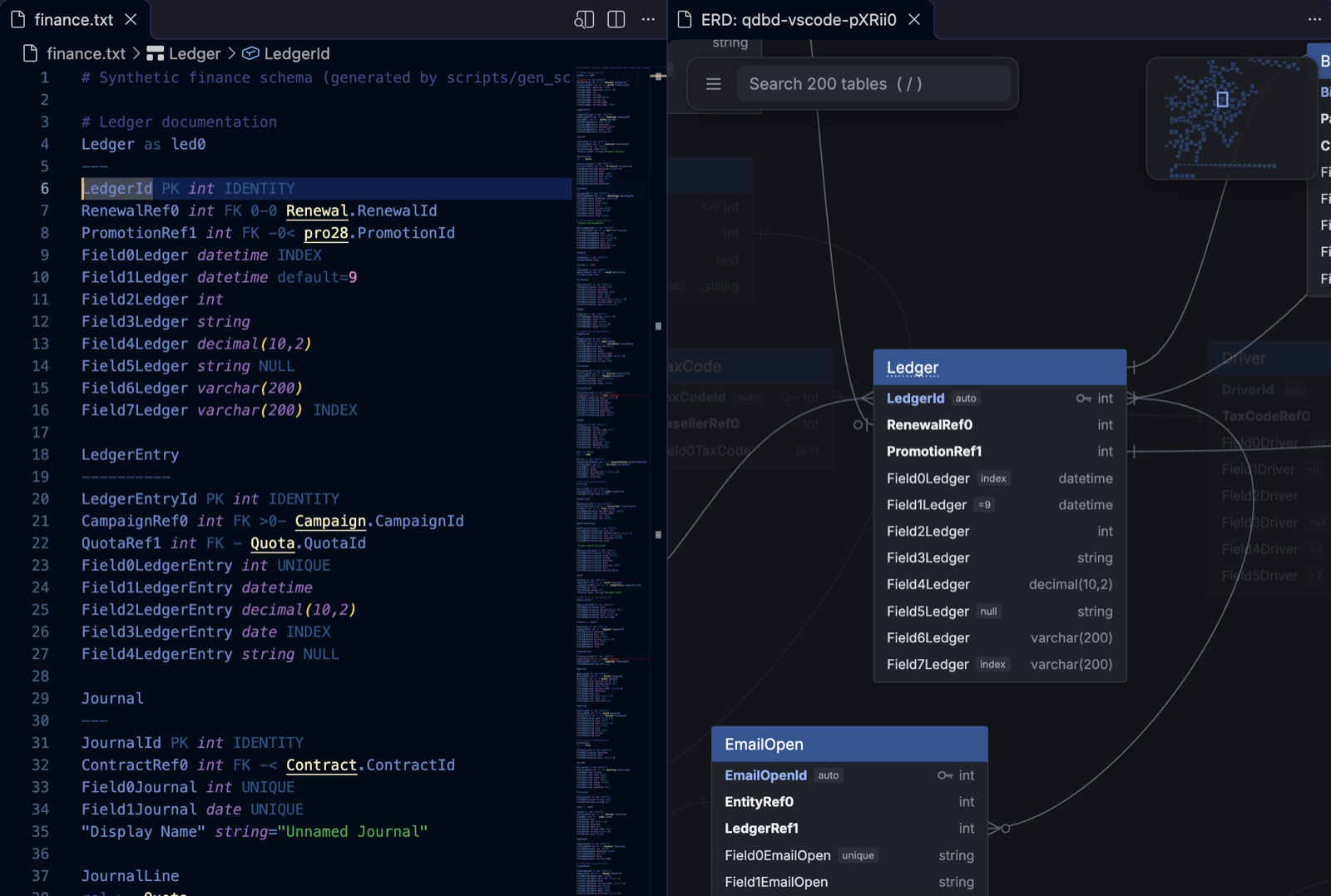
The QuickDBD (qdbd) extension brings qdbd into VS Code, Cursor, Windsurf and VSCodium:
- syntax highlighting for QuickDBD files
- errors and warnings as you type, before you save
- an outline of tables and columns, and F12 from a foreign key to the table it points at, across files
- the interactive diagram beside the editor, following your cursor
- export, share as a link, compare with a git branch, and import a dbt project, all from the Command Palette
You never need a terminal: the extension installs the qdbd CLI it runs on.
Get it: VS Code Marketplace (VS Code) · Open VSX (Cursor, Windsurf, VSCodium)
Install
- Install the extension: open the Extensions view (Cmd+Shift+X / Ctrl+Shift+X), search QuickDBD and pick QuickDBD (qdbd) by Minh Pham. It's on the VS Code Marketplace and, for Cursor, Windsurf and VSCodium, on Open VSX. Each GitHub release also has the
.vsixfile, for Install from VSIX… in the Extensions view's ⋯ menu. - Open a schema file. The extension runs the
qdbdCLI (version 0.1.17 or later) for every check and for the diagram. If it can't find one, it says so: click Install qdbd. It sets up a Python environment of its own and installsqdbdthere, which takes about a minute. You can also run QuickDBD: Install or Update qdbd from the Command Palette at any time.
Installing needs Python 3.11 or later on the machine (python.org), or uv, which downloads a Python by itself.
Which qdbd it uses:
- The
quickdbd.qdbdPathsetting, if you set it. - The workspace's
.venv(orvenv), so a project can pin its version. - Otherwise, the newer of its own install and the
qdbdon yourPATH. If you already use the CLI (uv tool install quickdbd-cli), the extension uses that one and installs nothing.
A version that's too old is skipped, and the extension offers Update qdbd.
Which files it opens as QuickDBD
QuickDBD files are plain .txt, so the extension decides by content. A .txt file opens as QuickDBD (shown at the right of the status bar) when either:
- it has a table (a name, then a
---line) and aPK,FKorrelline, or - a layout file sits next to it:
qdbd.layout.json, or<name>.layout.jsonfor<name>.txt.
To turn this off, set quickdbd.autoDetect to false. To mark files yourself, use VS Code's own setting:
Which files make up one schema
Foreign keys can point into other files, so the extension checks a file together with the rest of its schema, following the CLI's layout file conventions:
shop.txtwith ashop.layout.jsonbeside it is checked on its own.- Otherwise, the nearest folder above it (inside the workspace) that holds a
qdbd.layout.jsonis one schema, likeqdbd check that-folder/. - Otherwise, the file's own folder, if every
.txtfile under it is a schema and no layout file below it marks a separate project (likeexamples/synthetic/next toexamples/quickdbd-sample.txt). - Otherwise, the file on its own, so a stray
notes.txtdoesn't break the check.
Opening the diagram writes qdbd.layout.json for a folder (or <name>.layout.json for a single file), so after the first preview, rule 1 or 2 applies.
What you get
| Feature | How |
|---|---|
| Errors as you type | Squiggles and the Problems panel, from qdbd check. Unsaved text is checked against the other files on disk. Turn on quickdbd.strict to also fail on QuickDBD-compatibility warnings. |
| Outline | The Outline view, breadcrumbs and Ctrl+Shift+O list tables and their columns. Ctrl+T finds a table in any open schema. |
| Go to definition | F12 (or Ctrl/Cmd+click) on Customer.CustomerId, rel >- Product or an alias jumps to that table or column, in whichever file it is. |
| Diagram | QuickDBD: Open Diagram to the Side (Cmd+K V / Ctrl+K V, or the preview button at the top right of the editor). It's the same viewer as qdbd serve, and it updates when you save. |
| Follows your cursor | Move the cursor into a table and the diagram selects it and pans to it. Click it there for its details. |
| Back to the text | Double-click a table in the diagram, or click its file:line in the details panel, to open it in the editor. |
| Arrange | Drag tables in the diagram; positions are saved to the layout file, as in qdbd serve. |
| Theme | The diagram follows VS Code's light or dark theme. |
| Export | QuickDBD: Export PNG / SVG / draw.io asks where to save. With the cursor in a table, you can export just that table and its neighbours. QuickDBD: Export HTML Page writes the whole interactive diagram as one file, like qdbd build, and opens it in your browser. |
| Share | QuickDBD: Share as a Gist Link publishes the diagram as a secret gist, like qdbd share, and copies the link. It signs in with VS Code's GitHub account (the first time, VS Code asks), so the gh CLI isn't needed. Sharing again updates the same gist, also one made by qdbd share, so the link stays the same. |
| Compare with git | QuickDBD: Compare with Git Ref… (the compare button at the top right of the editor) picks a branch, tag or commit and opens the diagram coloured by what changed since then, as in a PR diff. It updates as you save. Pick HEAD to see what you haven't committed. |
| Import dbt | QuickDBD: Import dbt Project… turns a dbt project's target/manifest.json into schema files, like qdbd import dbt, into erd/ (one file per dbt folder) or one file you choose, then opens the diagram. Run dbt compile first; dbt docs generate adds column types. |
Settings
| Setting | Default | |
|---|---|---|
quickdbd.qdbdPath |
empty | Path to qdbd. Empty: the workspace's .venv, else the newer of the extension's own install and the one on PATH. |
quickdbd.autoDetect |
true |
Open matching .txt files as QuickDBD. |
quickdbd.strict |
false |
Report QuickDBD-compatibility warnings as errors. |
Troubleshooting
- Nothing happens: check the status bar says QuickDBD. If it says Plain Text, click it and pick QuickDBD, or add a
files.associationsentry. - "qdbd isn't installed": click Install qdbd, or run QuickDBD: Install or Update qdbd. If you installed it yourself and VS Code doesn't find it, set
quickdbd.qdbdPathto the full path (which qdbd). - "Installing qdbd needs Python 3.11 or later": install Python from python.org, then run QuickDBD: Install or Update qdbd.
- Compare says it can't read the ref: the schema must be in a git repository, and the ref must exist locally (fetch first for
origin/main). - Logs: View → Output, then pick QuickDBD from the list.
- Restricted mode: the extension runs a program (
qdbd), possibly from the workspace's virtualenv, so it stays off until you trust the workspace.